Faster images.
AI labeling done.
100 % GDPR-compliant.
Img Performer automatically converts your WordPress images to WebP (Free) or AVIF (PRO) – directly on your server, without limits. No API key. No account. No data leaves your website.
Free already detects AI-generated images on upload and adds the AI labeling required by EU AI Act Art. 50. PRO also generates AI alt texts on every upload – automatically accessible, without manual work.
AVIF directly on your server. No cloud upload, no DPA. The only plugin that covers both mandatory AI image labeling (EU AI Act Art. 50) and accessibility-compliant alt texts — all in one.
AI alt texts (PRO) require a DPA with your chosen AI provider.
Requires WordPress 6.0+ · PHP 7.4+ · GD library
Optimised file sizes and accessible images at the push of a button.
Img Performer is intentionally lean – focused on image optimisation without overhead.
Always the smallest format
Free converts to WebP. PRO additionally creates AVIF. On delivery, the automatically smaller format wins – not blindly AVIF, but what actually works better for this image. Fallback to original if needed.
100% GDPR-compliant – including AI
All image conversions run locally on your server. For AI alt texts (PRO) we recommend Mistral AI – EU company, EU servers, no data transfer to the US. OpenAI and Claude also supported. Retroactively generated alt texts automatically become visible site-wide – even in templates with hardcoded alt="".
All image sizes & viewports
All thumbnail sizes, srcset rewriting, and Retina support – automatically on every upload, for every resolution.
Unlimited – no monthly limit
No quotas, no credits, no subscription for the basics. Convert as many images as you want – free, without restriction.
No configuration needed
Activate the plugin – done. No API key, no account, no setup. Works immediately with any theme.
Theme-compatible
Works with Gutenberg, classic editor, and most themes. Page builders like Elementor or Divi may use their own image pipelines – a quick test is recommended there.
Admin-safe
WebP/AVIF only in the frontend. WordPress admin, REST API, and media library always show the original files.
EU AI Act Art. 50: AI image labeling
Detects AI-generated images on upload and writes hosting-independent labeling into every generated image size – no Imagick required. Visible frontend badge, manual correction in the Media Library. Free covers new uploads; PRO additionally scans and labels images already in your library.
Accessible images are not optional — they are required.
The European Accessibility Act mandates WCAG 2.1 AA. It applies to new websites from June 2025, to existing ones from June 2027. Every image needs a meaningful alt text.
of all WordPress images have no alt text
According to the WebAIM Million Report. With 500 images: 4+ hours of manual work — with no guarantee of EAA quality.
No image plugin solves this automatically
Most image optimisation plugins focus on file size — none of them generate accessibility metadata. Img Performer PRO closes this gap.
Img Performer PRO: automatically accessible
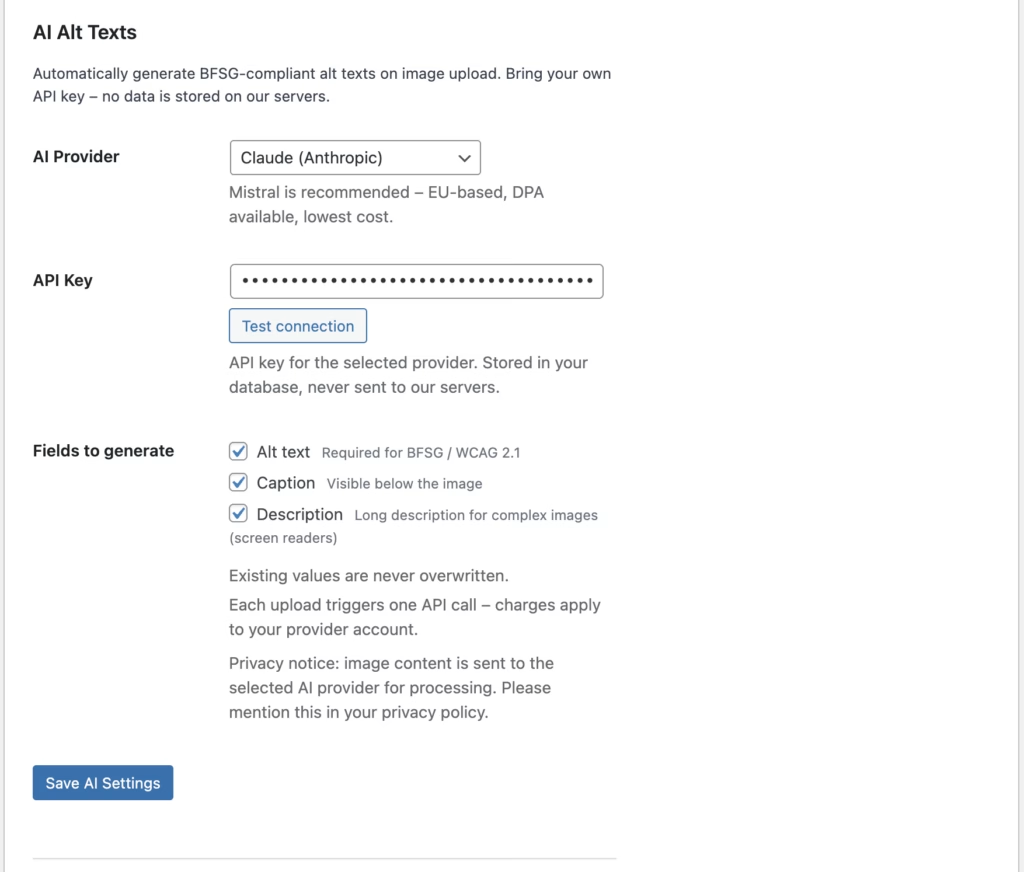
AI alt texts on every upload, bulk mode for the entire media library. Recommended: Mistral AI – EU company, EU servers, no data transfer to the US. Claude and OpenAI also available.
Img Performer vs. the competition
Cloud plugins transfer your images to external servers and require a Data Processing Agreement. Local alternatives sometimes offer a local mode – but AVIF often only via a paid CDN. None of the alternatives currently cover the AI labeling obligation under EU AI Act Art. 50.
| Feature | Img Performer | Cloud plugins | Local + CDN |
|---|---|---|---|
| WebP conversion | ✅ | ✅ | ✅ |
| AVIF locally – no CDN needed | PRO | PRO | ❌ |
| Automatically smallest format (AVIF vs. WebP) | ✅ | ❌ | ❌ |
| Unlimited conversions – no monthly limit | ✅ | ❌ | ✅ |
| Images never leave your server | ✅ | ❌ | ⚠️ |
| No account, no API key for Free | ✅ | ❌ | ⚠️ |
| No DPA / no privacy policy update needed | ✅ | ❌ | ⚠️ |
| AI alt texts – accessibility-compliant | PRO | ❌ | ❌ |
| AI image labeling – EU AI Act Art. 50 | ✅ | ❌ | ❌ |
| Retroactive bulk scan of existing images | PRO | ❌ | ❌ |
| Bulk conversion | PRO | PRO | ✅ |
| Image optimisation only – no plugin overhead | ✅ | ❌ | ❌ |
⚠️ Local alternatives sometimes require exec() on the server. Cloud services limit the free version to a few MB/month. AVIF with local plugins is often only available via a paid CDN.
Better together.
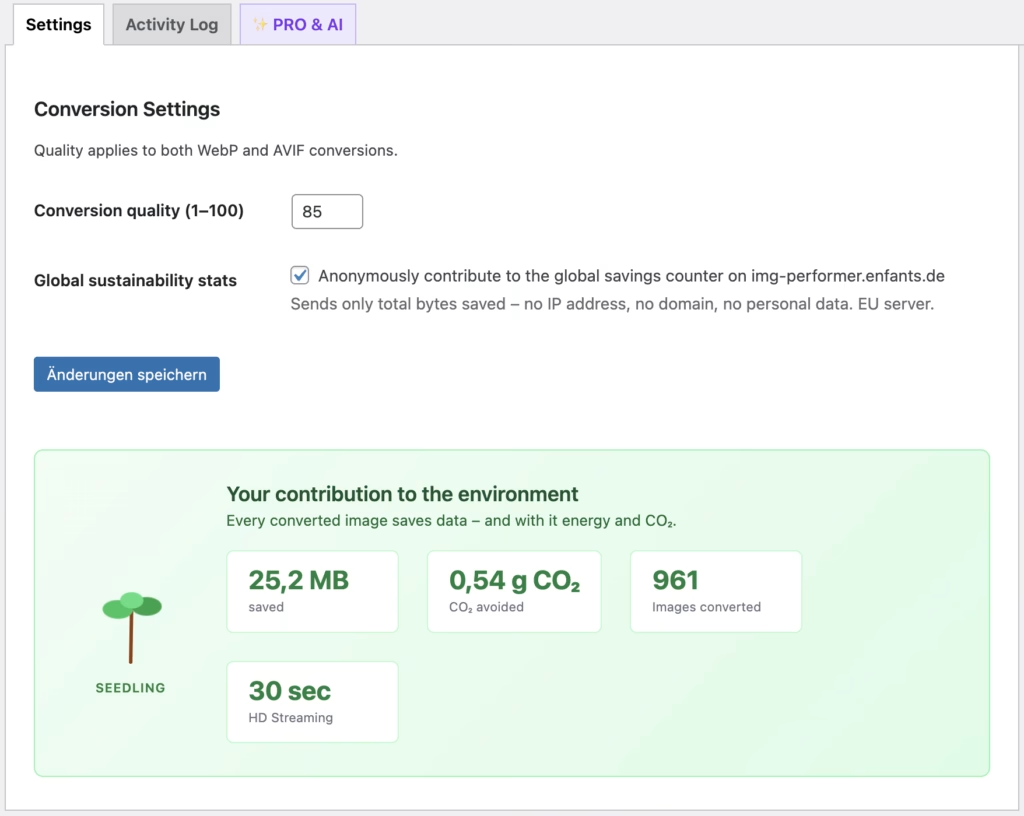
Every image Img Performer converts saves data – and therefore energy and CO₂. Small effort, real difference.
Users can voluntarily and anonymously contribute to the global stats. Only bytes are transmitted – no IP, no domain, no personal data.
Simple, fair pricing
Start for free – upgrade anytime.
Free
- ✓ WebP for all image sizes (thumbnails, medium, large)
- ✓ srcset rewriting for all viewports
- ✓ Unlimited conversions on upload
- ✓ Frontend delivery without third-party service
- ✓ Quality setting (1–100)
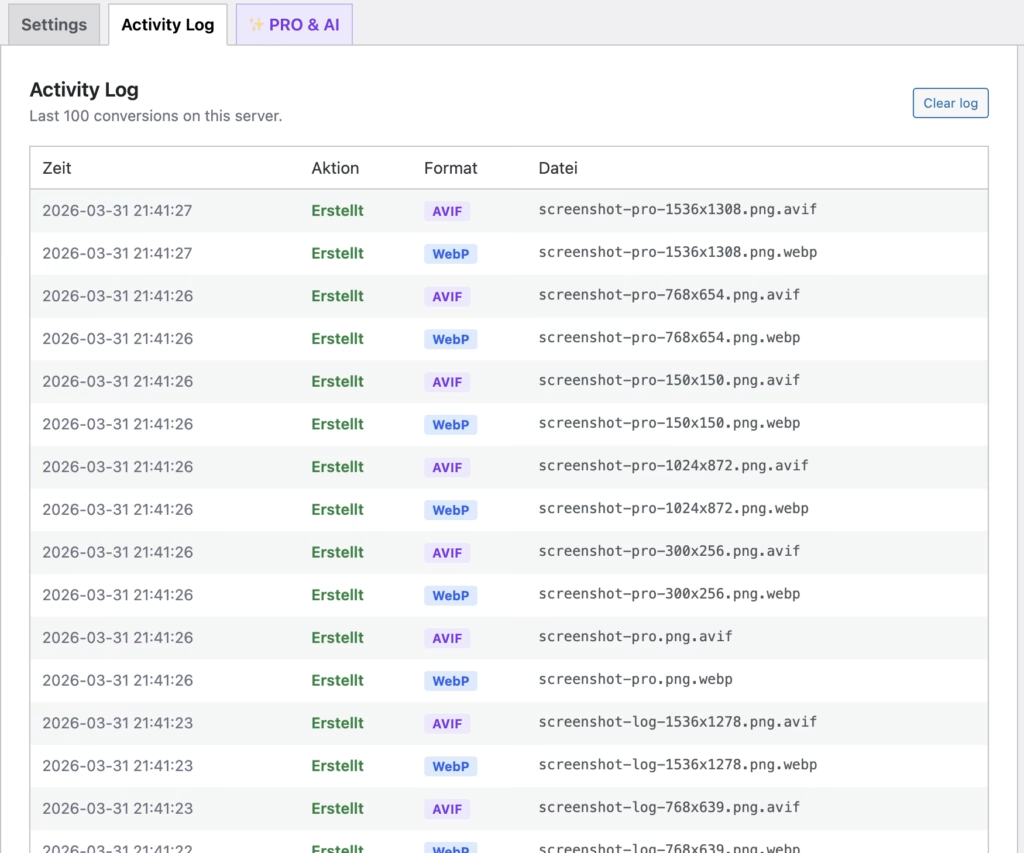
- ✓ Logging
- ✓ EU AI Act Art. 50: AI image labeling on upload
PRO
equals €5.75 / month
- ✓ Everything in Free
- ✓ AVIF on every upload – smallest file size, automatically preferred
- ✓ Bulk conversion of the entire media library (incl. all thumbnail sizes)
- ✓ AI alt texts: automatically accessibility-compliant alt texts, captions & descriptions
- ✓ AI label badge: position, color & contrast customizable
- ✓ Retroactive bulk scan: detect and label AI images already in your media library
- ✓ Background queue (large sites, no timeout)
- ✓ WP-CLI support
Release History
What we improved:
Behoben
- History-Tabelle (AI Labeling und File Optimization): lange Dateinamen brachten die Tabelle zum Umbrechen — jetzt mit
text-overflow:ellipsisgekürzt, voller Name als Tooltip beim Hover - Badge-Position bei ACF-Bildern: Das KI-Kennzeichnungs-Badge saß bei Bildern ohne das theme-eigene
display:block(z. B. ACF-Bildfelder) sichtbar zu weit unten —line-height:0am Badge-Wrapper behebt die Phantom-Lücke unterhalb des Bildes
Neu
- KI-Kennzeichnung nach EU AI Act Art. 50: Erkennt KI-generierte Bilder beim Upload (anhand eingebetteter Herkunftsdaten, z. B. C2PA-Manifeste) und schreibt eine eigene, hosting-unabhängige Kennzeichnung in Original und alle erzeugten Bildgrößen — kein Imagick nötig
- Sichtbares Frontend-Badge für KI-generierte Bilder, per Toggle an-/abschaltbar
- Manuelle Korrektur der automatischen Klassifizierung direkt im Anhang-Bearbeiten-Dialog der Mediathek
- “Needs review”-Filter und Status-Spalten (AI Labeling, Alt-Text) in der Mediathek-Listenansicht
- Durchsuchbarer Verlauf aller klassifizierten Uploads unter Einstellungen → AI Labeling
- Gilt ausschließlich für neue Uploads — bestehende Mediathek-Bilder werden nicht rückwirkend geprüft oder verändert
Behoben
- Bulk-Fortschrittsanzeige: Queue-Stand wird nach jedem Bild in die DB geschrieben — Fortschrittsbalken bleibt auch bei PHP-Timeouts oder blockierten Loopback-Requests konsistent
- Update-Hinweis: “Auf Updates prüfen” leert jetzt auch den internen Update-Cache — Update erscheint sofort statt erst nach 12 Stunden
Behoben
- Scan-Performance: Mediathek-Scan reduziert DB-Queries von N×2 auf 2 (Bulk-Query statt per-Bild-Abfrage) — spürbar schneller bei großen Mediatheken
- Lizenz-Deaktivierung im WordPress Playground: CORS-Header auf dem Lizenzserver ergänzt — Aktivierung und Deaktivierung funktionieren jetzt auch im Playground ohne Timeout
Verbessert
- Fortschrittsbalken in der Bulk-Konvertierung mit neuem Farbverlauf
- Grammatik-Fix: „1 images converted” → „1 image converted”
Requires Plugins-Slug korrigiert aufenfants-img-performer
Technisch
- Internes Prefix von
IMPaufEIMPumbenannt (WordPress.org-Richtlinie: mindestens 4 Zeichen)
Neu – PRO
- Bulk Converter: konvertiert die gesamte Mediathek mit einem Klick in WebP/AVIF (alle Thumbnail-Sizes)
- Background Queue via WP-Cron – verarbeitet Bilder in 10er-Batches ohne PHP-Timeout-Risiko
- Bulk-Konvertierungs-UI: AJAX-basiert, läuft automatisch durch alle Batches ohne Seitenreload
- Fortschrittsbalken zeigt Batch-Fortschritt live an (erledigt / gesamt)
- KI-Alt-Text-Generator: generiert Alt-Text, Caption und Beschreibung automatisch beim Upload
- Unterstützte KI-Anbieter: Mistral (Pixtral), Anthropic Claude (Haiku), OpenAI (GPT-4o mini)
- Bulk-KI-Queue: füllt fehlende Alt-Texte, Captions und Beschreibungen für alle bestehenden Bilder nach
- KI läuft via eigenem Cron-Event (
imp_pro_ai_process), vollständig getrennt von der Bildkonvertierung - Automatische Spracherkennung anhand des WordPress-Site-Locales (12 Sprachen unterstützt)
- Einzelne Felder steuerbar: Alt-Text, Caption und Beschreibung unabhängig aktivierbar
Behoben
- Bulk-Konvertierung erstellt jetzt korrekt WebP und AVIF für alle registrierten Bildgrößen
- Background Queue ruft
Converter::convert()auf statt der nicht vorhandenenon_upload()(war Fatal Error)
Technisch
- CSS-Styles werden jetzt korrekt über
wp_add_inline_styleeingebunden (kein<style>-Tag mehr im HTML) Flags.phpaus dem Free-Plugin entfernt – PRO-Erkennung läuft ausschließlich über denimp_is_pro_active-Filter im PRO-Plugin- Server-seitiger Statistik-Endpunkt-Code aus dem Plugin-ZIP ausgeschlossen
IMP_VERSION-Konstante in der Hauptdatei definiert
Neu
- Erster Release
- WebP-Konvertierung beim Upload via GD (
imagewebp), Imagick als Fallback - AVIF-Konvertierung (PRO) mit automatischer Formatauswahl nach Dateigröße
- Ersatz von
src,srcset,hrefunddata-*-Attributen im Frontend - Konfigurierbare Qualitätseinstellung (1–100, Standard 85)
- CO₂-Einsparungs-Tracker mit animierter Baum-Visualisierung
- Optionale anonyme globale Statistik (Opt-in)
- Aktivitätsprotokoll im Admin
Frequently asked questions
Is Img Performer GDPR-compliant?
Yes, fully. Img Performer converts all images exclusively on your own server. No image data, IP addresses, or other personal information is transferred to external services. You don’t need an external API key or an account with a cloud service.
What are the server requirements?
The server needs PHP 7.4+ and either GD with WebP/AVIF support (imagewebp(), imageavif()) or Imagick with corresponding support.
Most modern hosting providers meet these requirements.
The plugin checks availability on activation and shows a notice if anything is missing.
Are my images transferred to external servers?
No. Img Performer converts exclusively on your own server. No image data, IP addresses, or other information is transferred to external services.
You don’t need an external account, no API key, and don’t need to update your privacy policy. Cloud-based image optimisation plugins transfer images to external servers — which requires a Data Processing Agreement (DPA) and privacy policy updates. With Img Performer, none of that applies.
The optional AI alt text feature (PRO) transfers image data to the AI provider of your choice. We recommend Mistral AI — an EU company with EU servers, simpler GDPR handling than US providers.
What is WebP — and what can it do?
WebP is a modern image format from Google, available since 2010 and supported by all current browsers. Compared to JPEG, WebP typically saves 25–35% file size at the same perceived quality — without visible quality loss for visitors.
WebP supports both lossy and lossless compression as well as transparency (alpha channel). It’s the ideal replacement for JPEG and PNG and works reliably in Chrome, Firefox, Safari, Edge, and all modern mobile browsers.
Img Performer converts your uploads to WebP automatically — free, locally on your server, without any external service.
What is AVIF — and what can it do?
AVIF (AV1 Image File Format) is currently the most modern image format, based on the open-source AV1 video codec. It achieves 30–50% better compression than WebP — at equal or higher image quality.
AVIF supports HDR, wide colour gamut, lossless and lossy compression, and transparency. Browser support is already excellent: Chrome, Firefox, Safari 16+, and Edge fully support AVIF. For older browsers, Img Performer automatically delivers WebP or the original as a fallback.
AVIF conversion is a Pro feature of Img Performer — for those who want to get the maximum out of their load times.